As you can see that I have uploaded the some what my movie but i still think it is missing the special touch??
THINK???
Friday, April 1, 2011

Wednesday, March 30, 2011
What software I used and My Creation Process
What Software I used
The Software I used was called INKSCAPE. Inkscape is a vector graphicseditor application. It is distributed under a free software license, the GNU GPL. Its stated goal is to become a powerful graphics tool while implementing full support for the Scalable Vector Graphics standard.
Creation Process
It all started when Sir gave us this task and showed us how to make a simple animation by using the example of a bouncing ball. Afterwards sir explained the task, which was on word, it looked like this:
 The task read that you need to make a animation on your house(mine is coolock), it should at least go for 5 seconds or more. There other stuff written on it. But not looking at the sheet in lots of detail. I started with thinking and making a mind map that like looked like this:
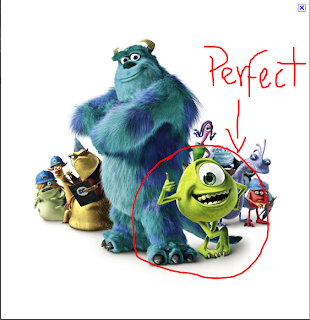
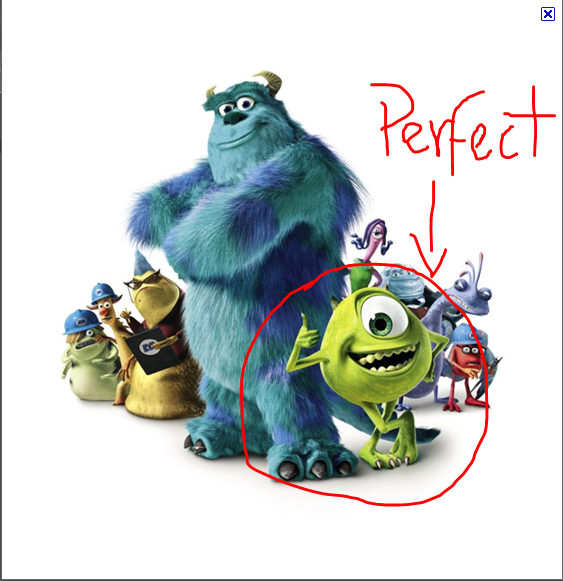
 From that mind map, I went on google images a put in the search bar "Green Things" and I found so many good mascots that are green, The one that attract my attention first was a green M&M which you can see from the previous posts, thinking that I will use this, I opened up inkscape and copy and pasted the picture of the M&M and I started to think how i was going to trace over this, due to the difficult lines and curves, there were fantastic tools like bezier tool and the Nodes tool. But i thought that i will leave it on the side and think of some other ideas, so I went back to the site where I saw the Green M&M, and look what found!? A green Cartoon Character called Mike Wazowski from Monster's Inc.
 So after all of this was finalized I started the process, firstly I traced Mike and coloured him and it looked like this:
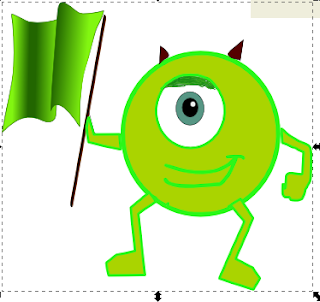 Afterwards I made Him dance and added lots of effects, including clovers, and M&Ms Holding signs at the end. Also I topped it off with using moviemaker, to put my video together!
The Software I used was called INKSCAPE. Inkscape is a vector graphicseditor application. It is distributed under a free software license, the GNU GPL. Its stated goal is to become a powerful graphics tool while implementing full support for the Scalable Vector Graphics standard.
Creation Process
It all started when Sir gave us this task and showed us how to make a simple animation by using the example of a bouncing ball. Afterwards sir explained the task, which was on word, it looked like this:



Monday, March 28, 2011
Drawing cartoon Body shapes
Today since I thought that I have kind of finished my assignment, and I can do it at Home. I started my Step 2 Tasks, one of which was drawing cartoons bodies. I tried doing that on word, then I realised how hard it is to draw on word, than inkscape. Here is my word image:
 And here is my Inkscape version
 You can probably see the difference. The drawing in inkscpae is much more sophisticated than the drawing in word

Friday, March 25, 2011
Image File Types
We were asked to write at the different image file types. The ones were going to research on are:
*GIF Files
*JPEG Files
*Animated Files
*MPEG Files
*Shockwave Files
GIF Files
The Graphics Interchange Format (GIF) is a bitmap image format that was introduced by CompuServe in 1987,it is also a bitmap image format for pictures with up to 256 distinct colors.
JPEG Files
In computing, JPEG (, ) (named after the Joint Photographic Experts Group who created the standard) is a commonly used method of lossy compression for photographic images.
Animated Files
MPEG Files
Shockwave Files
SWF (pronounced /ˈswɪf/ swif)[1] is a file format for multimedia, vector graphics and ActionScript in the Adobe Flash environment.[2] Originating with FutureWave Software, then transferred to Macromedia, and then coming under the control of Adobe, SWF files can contain animations or applets of varying degrees of interactivity and function.
*GIF Files
*JPEG Files
*Animated Files
*MPEG Files
*Shockwave Files
GIF Files
The Graphics Interchange Format (GIF) is a bitmap image format that was introduced by CompuServe in 1987,it is also a bitmap image format for pictures with up to 256 distinct colors.
JPEG Files
In computing, JPEG (, ) (named after the Joint Photographic Experts Group who created the standard) is a commonly used method of lossy compression for photographic images.
Animated Files
MPEG Files
Shockwave Files
SWF (pronounced /ˈswɪf/ swif)[1] is a file format for multimedia, vector graphics and ActionScript in the Adobe Flash environment.[2] Originating with FutureWave Software, then transferred to Macromedia, and then coming under the control of Adobe, SWF files can contain animations or applets of varying degrees of interactivity and function.
COLOUR DEPTH
-GIF Files
-GIF Files
24 bits
-JPEG Files
More than GIF
 |  |
-Animated Files
16bits
-MPEG Files
24 bits
-Shockwave Files
8Bits
FILE SIZES
GIF files use a color pallette with a fixed number of colors (256 colors to be exact). Gif files are typically used where there are no gradients and/or where there is a limited number of colors (as in the orange and white example that you will see later).
JPG files are compressed image files but there are different levels of compression. You select which is best for your application. Jpg files are most commonly used for photographs. They are supported by virtually every application.
Although this section is labeled 'still image Files', there is one that's not exactly a 'still' image. Animated gifs are a string of gif files. They are displayed one after the other and will look like a crude video. They are typically used for advertising banners (you know the awful flashing ones that drive you mad).
VECTOR OR BITMAPPED??
Vector images (also known as raster images) are made up of pixels in a grid. Pixels are picture elements; tiny dots of individual color that make up what you see on your screen.images are made up of many individual, scalable objects.
Bitmapped objects are defined by mathematical equations rather than pixels, so they always render at the highest quality. Objects may consist of lines, curves, and shapes with editable attributes such as color, fill, and outline.
My Movie
I think i am done. I converted to window live media. to make it a proper movie. Then I saved it as a stardard defintion file. Below is my Movie. And I might make some changes to it. Depending, anyway here is the movie:
Wednesday, March 23, 2011
22/03/11
Today, i realsied that that the assignment date was coming nearer. I realised i was quite behind and i needed to end my animation. Basically my animation is the thing i told you beofre Mike dancing, also i added some more parts to it like, Mike kicks all the other colours which are represented in the words,beats the rest! and after they are kicked away then 20 or 25 little M&M figures come holding signs saying coolock is the best. Here is a little snipping of it:

I took some advice from my fellow classmates and also my family. And then gave the advice of adding more frames, "things happen too quickly", "slow it down". So tomorrow im working on improving it. Its due in a week. BETTER HURRY UP !

I took some advice from my fellow classmates and also my family. And then gave the advice of adding more frames, "things happen too quickly", "slow it down". So tomorrow im working on improving it. Its due in a week. BETTER HURRY UP !
bouncing ball
Today was a awesome day. Mr. Lennon showed us how to make a simple animation on inkscape and to finish it of on Windows Live Movie Maker. First of all Sir made us draw a ball and a Line underneath it. Then we had to Export it to a bitmapped image. After that was doen we had to create another frame which was simply just moving the ball a little down, then save it again, we continued doing this until the ball eventually hit the line which was the ground. When the ball hit the ground we had to make it look squshed so it looks like it touched the ground. After wards we had to make the ball go back up. And sir said, here is where we get to "cheat". We just had to copy all the exsiting frames but put them in the other order because were reversing the movement. Here are a series of pictures the show this. (NOT IN ORDER)


Subscribe to:
Posts (Atom)